Getting a Sitecore JSS headless component to render end-to-end is rarely a straight line. In this post, I walk through exactly what happened after we finally got the Json Rendering template installed in Sitecore, the issues that surfaced one by one, the steps we took to diagnose and fix each one, and the outcome. If you are setting up Sitecore 10.4 with Next.js in a Docker environment, this post will save you hours (I am not kidding).
The goal was straightforward: create a Sign Up Form component driven by Sitecore content, rendered through the JSS Layout Service in a Next.js 15 app running in connected mode.
Issue 1: Creating the Sign Up Form Rendering Item
The Problem
With the Json Rendering template now available in Sitecore, the next step was to create the actual rendering item under /sitecore/layout/Renderings/Project/. In the Content Editor, we navigated to the Project folder and used Insert from Template, searched for Json Rendering, named it Sign Up Form, and filled in the Component Name field as SignUpForm (to match the TSX filename exactly) and set the Datasource Location to ./.
What We Did
- Navigated to /sitecore/layout/Renderings/Project in Content Editor
- Right-clicked Project folder and chose Insert from Template
- Searched for Json Rendering template and selected it
- Set Component Name to SignUpForm (case-sensitive, must match the .tsx filename)
- Set Datasource Location to ./ and configured Allowed on Templates to use the Sign Up Form data template
Outcome
The rendering item was created successfully with the correct template type. The component name matched the Next.js component file, which is critical for JSS component resolution.
Issue 2: Page Not Found on the Next.js Side
The Problem
After creating the sign-up page in Sitecore and assigning the rendering, navigating to http://localhost:3000/sign-up returned “Page not found. This page does not exist.” The Next.js app was running in connected mode but could not find the page.
Root Cause
The JSS site configuration file (sitecore-headless-demo.config) deployed to Sitecore pointed the rootPath to /sitecore/content/sitecore-headless-demo which did not exist. Our content was under /sitecore/content/Home. Additionally, the SITECORE_SITE_NAME environment variable was set to default which is not a registered site in this Sitecore instance.
What We Did
- Tested the Layout Service directly via PowerShell to verify Sitecore was returning data
- Updated the site config rootPath from /sitecore/content/sitecore-headless-demo to /sitecore/content/Home and set startItem to /
- Updated SITECORE_SITE_NAME in the .env file from default to sitecore-headless-demo
- Restarted the CM Docker container and the Next.js dev server
Outcome
The Layout Service began returning HTTP 200 with route data for the sign-up page, confirming Sitecore could now resolve the page within the correct site context.
Issue 3: rootItemId Auto-Resolution Failure
The Problem
After fixing the site name, the Next.js app connected to Sitecore but threw a runtime error: “Valid value for rootItemId not provided and failed to auto-resolve app root item.” This originated in the GraphQL Dictionary Service.
Root Cause
The JSS SDK’s GraphQL Dictionary Service tries to auto-resolve the root item ID using the app name. In a standard SXA multisite setup this works automatically, but in our custom single-site Docker setup it could not find the app registration needed for auto-resolution.
What We Did
- Queried the GraphQL endpoint to get the Sitecore item ID for /sitecore/content/Home
- Got back ID: {xxxxxxxx-xxxx-xxxx-xxxx-xxxxxxxxxxxx}
- Opened src/lib/dictionary-service-factory.ts and uncommented the rootItemId option, setting it to the resolved GUID
Outcome
The rootItemId error was resolved and the app proceeded to render the page. The dictionary service could now fetch translations without needing auto-resolution.
Issue 4: pageTitle Field Undefined Runtime Error
The Problem
The page began loading but immediately threw: “Cannot read properties of undefined (reading ‘value’)” at Layout.tsx line 31. The error pointed to fields.pageTitle.value.
Root Cause
The default Layout.tsx shipped with the JSS starter assumes every page item has a pageTitle field. Our Sign Up Form template did not include a pageTitle field, so the field was undefined at runtime.
What We Did
Updated Layout.tsx to use optional chaining so the title access does not throw when the field is missing:
Changed: fields.pageTitle.value.toString() To: fields?.pageTitle?.value?.toString() || ‘Page’
Outcome
The runtime error was eliminated. The page title gracefully falls back to ‘Page’ when no pageTitle field is present on the item.
Issue 5: Page Rendered but Form Component Was Missing
The Problem
The page loaded at /sign-up but only showed the default JSS navigation links (JSS Documentation, JSS Repository). The Sign Up Form component was completely absent.
Root Cause
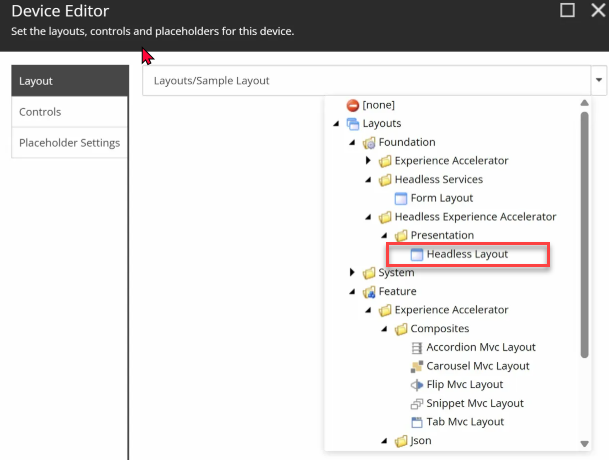
Two separate mismatches were causing this. First, the Sitecore item had the placeholder set to jss-main but the Headless Layout uses headless-main. Second, the layout assigned to the page was Sample Layout, a legacy MVC layout — not the Headless Layout required for JSS rendering. Because the wrong layout was set, the Layout Service returned empty placeholders ({“placeholders”: {}}) even though the rendering was correctly assigned.
What We Did
- In Sitecore Content Editor, navigated to the sign-up item and opened Presentation Details
- Changed the Layout from Sample Layout to Headless Layout found at Foundation / Headless Experience Accelerator / Presentation / Headless Layout
- Edited the Sign Up Form rendering control and changed the placeholder from jss-main to headless-main
- Published the item
- Updated Layout.tsx to render the headless-main placeholder instead of jss-main
Outcome
The Layout Service response now included the rendering inside the headless-main placeholder with full field data. The Next.js app picked it up and rendered the SignUpForm component.
Final Result
Navigating to http://localhost:3000/sign-up now renders the full Sign Up Form component with:
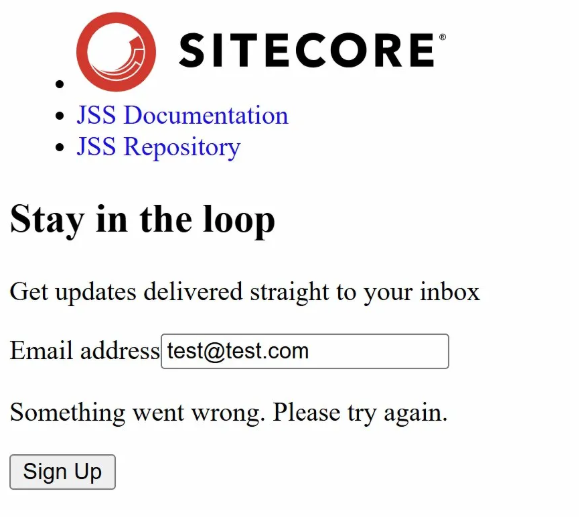
- Heading: Stay in the loop
- Subheading: Get updates delivered straight to your inbox
- Email input field with validation
- Sign Up button with loading state
- Error message (Normal since I didn’t plugged it to an email server yet).
All content is driven by the Sitecore datasource item, meaning editors can update the heading, subheading, button text, and success message from the Sitecore Content Editor without touching any code.
Key Lessons Learned
- Always use Headless Layout for JSS pages : Sample Layout and MVC layouts will not populate JSS placeholders
- The placeholder name in Sitecore must exactly match what the Next.js Layout.tsx renders — headless-main for Headless Experience Accelerator setups
- The JSS site config rootPath and the SITECORE_SITE_NAME env variable must be consistent and point to where your content actually lives
- When rootItemId auto-resolution fails, query GraphQL directly for the item ID and hardcode it in dictionary-service-factory.ts
- Use optional chaining on Layout.tsx field access — not every page template will have a pageTitle field