If you’ve set up Sitecore 10.4 in Docker containers using the docker-examples-jss repository and tried hitting the GraphQL endpoint at /sitecore/api/graph/edge, only to be greeted by a frustrating 404, you’re not alone. I spent days debugging this issue, and the root cause turned out to be a significant gap between what the Docker images ship with and what’s actually needed for headless development.
Here’s the full story — and the step-by-step fix.
The Setup
My environment was straightforward: Sitecore XP 10.4 running in Docker containers via the docker-examples-jss repository, with a Next.js frontend intended to consume content through Sitecore’s GraphQL API. You can get this from Github here and nextJS here.
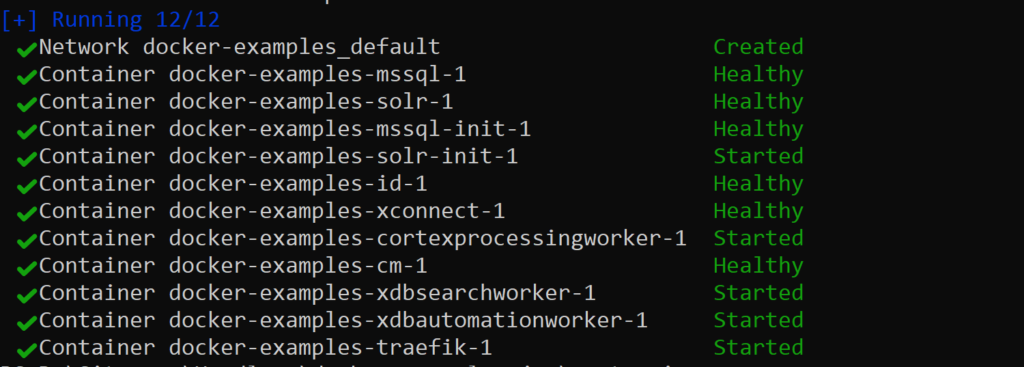
The Docker stack was healthy — all containers (CM, Identity Server, MSSQL, Solr, xConnect, Traefik) were running and reporting as Healthy. I could log into Sitecore at https://cm.dockerexamples.localhost/sitecore/login without issue.
But the moment I tried to reach the GraphQL endpoint:
curl https://cm.dockerexamples.localhost/sitecore/api/graph/edge -k
I got this:
Object moved to /sitecore/service/notfound.aspx
  ?item=%2fsitecore%2fapi%2fgraph%2fedge
  &user=extranet%5cAnonymous
  &site=website
A Sitecore-styled “Document Not Found” page. Not a raw IIS 404 — Sitecore’s own item resolution pipeline was handling the request and finding nothing.
The Investigation
What Made It Confusing
The GraphQL assemblies were present and loaded. Checking the CM container logs confirmed it:
✅ sitecore.graphql.core.dll
✅ sitecore.graphql.netfxhost.dll
✅ sitecore.graphql.schema.dll
✅ sitecore.graphql.services.dll
✅ Hot Chocolate 10.5.5 assemblies (14 DLLs)
The environment variable Sitecore_GraphQL_Enabled was set to true. The .env file had both SITECORE_GRAPHQL_ENABLED=true and SITECORE_GRAPHQL_EXPOSEPLAYGROUND=true.
Everything looked right. So why 404?
The Red Herrings
I chased several leads that went nowhere:
- Checking
web.configfor handler mappings — no GraphQL handlers registered, but adding them manually didn’t help - Modifying site definitions — the 404 response showed
&site=website, suggesting routing issues, but changing site configs wasn’t the answer - Enabling disabled LayoutService configs — found files like
Sitecore.LayoutService.GraphQL.config.disabledinApp_Config/Modules/SXA/Z.LayoutService/, renamed them to enable them, but the endpoint still returned 404
When the “Aha” happened
When I listed the GraphQL-related config files in the container, the picture became clear:
App_Config/Include/Sitecore.GraphQL.Containers.config     ← Settings only
App_Config/Sitecore/Sitecore.GraphQL/Sitecore.GraphQL.config  ← Schema registration only
App_Config/Modules/SXA/Z.LayoutService/Sitecore.LayoutService.GraphQL.config  ← Pipeline only
None of these files define a GraphQL HTTP endpoint. They configure schemas, pipelines, and settings — but no actual endpoint like /api/graph/edge is registered anywhere.
The Root Cause
Here’s the architecture of what was happening versus what I expected:
┌──────────────────────────────────────────────────────────┐
│              WHAT THE DOCKER IMAGE SHIPS                 │
├──────────────────────────────────────────────────────────┤
│                                                          │
│  ✅ GraphQL Runtime Assemblies                           │
│     (Sitecore.GraphQL.*, Hot Chocolate)                  │
│                                                          │
│  ✅ GraphQL Base Configuration                           │
│     (Schema registration, settings, search translators)  │
│                                                          │
│  ✅ SXA + SPE Modules                                    │
│     (Experience Accelerator, PowerShell Extensions)      │
│                                                          │
│  ❌ Sitecore Headless Services (JSS) Module              │
│     NOT INCLUDED                                         │
│                                                          │
│  ❌ JSS DLLs                                             │
│     (Sitecore.JavaScriptServices.*.dll)                  │
│                                                          │
│  ❌ GraphQL Endpoint Registration                        │
│     (No /api/graph/edge route)                           │
│                                                          │
│  ❌ Layout Service Endpoints                             │
│     (No /api/layout/render routes)                       │
│                                                          │
└──────────────────────────────────────────────────────────┘
The docker-examples-jss repository name is misleading. Despite having “jss” in its name, the Docker images it builds do not include the Sitecore Headless Services (JSS) module. The CM Dockerfile only copies SPE and SXA modules:
# From the CM Dockerfile:
COPY --from=spe \module\cm\content .\     # ✅ PowerShell Extensions
COPY --from=sxa \module\cm\content .\     # ✅ Experience Accelerator
# ❌ No JSS module copy!
The base Sitecore XP 10.4 image ships with GraphQL assemblies (they’re part of the platform), but those assemblies alone don’t create usable HTTP endpoints. The Headless Services module is what wires everything together — registering the /api/graph/edge route, deploying JSS-specific DLLs, and installing necessary Sitecore items (templates, API key definitions, etc.) into the databases.
Why the Assemblies Exist Without the Module
Think of it this way: Sitecore 10.4 includes the GraphQL engine as part of its platform for its own internal authoring APIs. But the headless content delivery endpoints — the ones your Next.js app needs — are provided by a separate module that must be explicitly installed. I have downloaded the NextJS project from Sitecore as a sample project here .
┌─────────────────────────────┐
│     Sitecore XP 10.4        │
│     Base Platform            │
│                             │
│  ┌───────────────────────┐  │
│  │  GraphQL Engine       │  │    ← Included in base image
│  │  (Hot Chocolate,      │  │    ← Used internally by Sitecore
│  │   Sitecore.GraphQL.*) │  │    ← NO public endpoints registered
│  └───────────────────────┘  │
│                             │
│  ┌ ─ ─ ─ ─ ─ ─ ─ ─ ─ ─ ┐  │
│    Headless Services     │  │    ← NOT included
│  │ (JSS Module)             │    ← Must be installed separately
│    /api/graph/edge       │  │    ← Registers the endpoint
│  │ /api/layout/render       │    ← Registers Layout Service
│    JSS DLLs              │  │    ← Required runtime assemblies
│  └ ─ ─ ─ ─ ─ ─ ─ ─ ─ ─ ┘  │
│                             │
└─────────────────────────────┘
The Fix: Step by Step
Step 1: Verify Your License Supports Headless Services
Before anything else, confirm your license includes JSS support:
if ((Get-Content D:\License\license.xml -Raw) -match "Sitecore.JSS") {
    Write-Host "YES - JSS license found"
} else {
    Write-Host "NO - JSS license NOT found"
}
For Sitecore 10.2+, subscription licenses include Headless Services. If you have a perpetual license, you may need to contact your account manager.
Step 2: Download Sitecore Headless Rendering 22.0.0
This is the version compatible with Sitecore XP 10.4.
- Go to Sitecore Headless Rendering Downloads
- Log in with your Sitecore developer account
- Download Sitecore Headless Services for Sitecore XP (use the XM version if you don’t have xConnect/xDB)
Step 3: Install via Sitecore Installation Wizard
The package needs to be installed through Sitecore’s UI, not just dropped into a folder.
- Log into Sitecore:
https://<your-cm-host>/sitecore/login - Go to the Desktop:
https://<your-cm-host>/sitecore/shell/default.aspx - Open Development Tools → Installation Wizard
- Upload the downloaded
.zippackage - Follow the wizard to install
Important: The Installation Wizard deploys both files (configs, DLLs) and Sitecore items (templates, settings) into the databases. This is why you can’t just copy files manually — the database items are equally important.
Step 4: Handle the Missing DLL Problem
Here’s where I hit another snag. After installing the package, Sitecore crashed with:
Could not load file or assembly 'Sitecore.JavaScriptServices.AppServices'
The Installation Wizard deployed the config files and database items, but not the DLL files to the bin folder. This may be a Docker-specific issue with how the wizard handles file deployment.
To fix this:
Extract the DLLs from the package manually:
# Extract the outer package
Expand-Archive -Path "downloaded-package.zip" -DestinationPath "C:\temp\headless" -Force

# Extract the inner package.zip
Expand-Archive -Path "C:\temp\headless\package.zip" -DestinationPath "C:\temp\headless\package" -Force

# The DLLs are in:
# C:\temp\headless\package\files\bin\
Copy them into the container. If your CM has a deploy volume mounted:
# Copy DLLs to the host-side deploy folder
Copy-Item "C:\temp\headless\package\files\bin\*" `
    "D:\path\to\custom-images\docker\deploy\website\" -Force

# Move them to the bin folder inside the container
docker compose exec cm powershell -Command `
    "Copy-Item 'C:\deploy\*.dll' 'C:\inetpub\wwwroot\bin\' -Force"
The DLLs you need include:
| DLL | Purpose |
|---|---|
Sitecore.JavaScriptServices.AppServices.dll | Core JSS app services |
Sitecore.JavaScriptServices.Configuration.dll | JSS configuration |
Sitecore.JavaScriptServices.Core.dll | Core JSS functionality |
Sitecore.JavaScriptServices.GraphQL.dll | JSS GraphQL integration |
Sitecore.JavaScriptServices.ViewEngine.dll | Server-side rendering |
Sitecore.Services.GraphQL.dll | GraphQL service layer |
Sitecore.Services.GraphQL.EdgeSchema.dll | Edge endpoint schema |
Sitecore.Services.GraphQL.Content.dll | Content GraphQL schema |
Sitecore.LayoutService.dll | Layout Service core |
GraphQL.dll + GraphQL-Parser.dll | GraphQL library |
Step 5: Restart and Verify
docker compose restart cm
Start-Sleep -Seconds 90
curl https://<your-cm-host>/sitecore/api/graph/edge -k
Expected response:
{"errors":[{"message":"SSC API key is required. Pass with 'sc_apikey' query string or HTTP header."}]}
This means the endpoint is alive!
Step 6: Create and Publish an API Key
- In Sitecore Content Editor, navigate to
/sitecore/system/Settings/Services/API Keys - Insert a new API Key item
- Set CORS Origins to
*and Allowed Controllers to* - Save the item
- Publish the item (this is critical — the key must exist in the
webdatabase) - Copy the item’s GUID (this is your API key)
Test:
curl "https://<your-cm-host>/sitecore/api/graph/edge?sc_apikey=YOUR-GUID" -k
Expected response:
{"errors":[{"message":"No query was provided!"}]}
That means everything is working.
Step 7: Configure Your Next.js Frontend
In your Next.js project’s .env file:
SITECORE_API_HOST=https://<your-cm-host>
SITECORE_API_KEY=YOUR-GUID-WITHOUT-BRACES
GRAPH_QL_ENDPOINT=https://<your-cm-host>/sitecore/api/graph/edge
NODE_TLS_REJECT_UNAUTHORIZED=0
The NODE_TLS_REJECT_UNAUTHORIZED=0 is needed because Docker’s Traefik uses self-signed certificates.
Diagnostic Checklist
If you’re stuck with GraphQL returning 404 in a Sitecore Docker setup, run through this checklist:
1. What kind of 404 are you getting?
| Response | Meaning |
|---|---|
Sitecore-styled “Document Not Found” with &site=website | Sitecore’s item pipeline is handling the request — the GraphQL handler isn’t registered |
Raw IIS 404 - File or directory not found | IIS doesn’t know about the route at all |
Plain 404 page not found | Traefik/reverse proxy can’t route to the endpoint |
{"errors":[...]} | GraphQL IS working — the error message tells you what’s wrong |
2. Are the JSS DLLs present?
docker compose exec cm powershell -Command `
    "Test-Path 'C:\inetpub\wwwroot\bin\Sitecore.JavaScriptServices.AppServices.dll'"
3. Are the JSS config files enabled?
docker compose exec cm powershell -Command `
    "Get-ChildItem 'C:\inetpub\wwwroot\App_Config' -Recurse -Include '*JavaScriptServices*' | Select-Object FullName"
4. Is GraphQL enabled?
docker compose exec cm powershell -Command `
    "[Environment]::GetEnvironmentVariable('Sitecore_GraphQL_Enabled')"
5. Is the Edge schema registered?
docker compose exec cm powershell -Command `
    "Get-ChildItem 'C:\inetpub\wwwroot\App_Config' -Recurse -Include '*Edge*','*Services.GraphQL*' | Select-Object FullName"
Key Takeaways
- The Docker image name is misleading.
docker-examples-jssdoes not include JSS. The CM Dockerfile only copies SPE and SXA — not the Headless Services module. - GraphQL assemblies ≠ GraphQL endpoints. The presence of
Sitecore.GraphQL.*.dlland Hot Chocolate in the bin folder doesn’t mean HTTP endpoints are registered. Those assemblies serve Sitecore’s internal authoring APIs. - The Headless Services module must be explicitly installed. It provides the
/api/graph/edgeendpoint, Layout Service, JSS DLLs, and required database items. - The Installation Wizard may not deploy DLLs in Docker. You might need to manually extract DLLs from the package and copy them into the container’s bin folder.
- API keys must be published. Creating an API key in Content Editor isn’t enough — it must be published to the
webdatabase before the GraphQL endpoint will accept it. - Check the 404 type. A Sitecore-styled 404 and a raw IIS 404 mean very different things. The former means Sitecore is handling the request (endpoint not registered); the latter means IIS doesn’t know about the route at all.
Final Architecture
Once everything is installed and configured correctly:
┌─────────────────┐                        ┌──────────────────────────┐
│   Next.js App   │  ── GraphQL Query ──►  │  Traefik Reverse Proxy   │
│  localhost:3000  │     + sc_apikey        │  :443 (SSL termination)  │
│                 │  ◄── JSON Response ──  │                          │
└─────────────────┘                        └───────────┬──────────────┘
                                                       │
                                           ┌───────────▼──────────────┐
                                           │     Sitecore CM          │
                                           │                          │
                                           │  /api/graph/edge ◄───────┤ Headless Services
                                           │    ├─ Edge Schema        │ (JSS Module)
                                           │    ├─ Layout Service     │
                                           │    └─ Content Resolver   │
                                           │                          │
                                           │  GraphQL Engine ◄────────┤ Base Platform
                                           │    ├─ Hot Chocolate      │
                                           │    └─ Schema Registry    │
                                           │                          │
                                           └───────────┬──────────────┘
                                                       │
                                     ┌─────────────────┼──────────────┐
                                     │                 │              │
                               ┌─────▼─────┐   ┌──────▼────┐  ┌─────▼─────┐
                               │   MSSQL   │   │   Solr    │  │ xConnect  │
                               │ (Content) │   │ (Search)  │  │ (xDB)     │
                               └───────────┘   └───────────┘  └───────────┘
The journey from 404 to a working GraphQL endpoint was long, but the lesson is clear: in Sitecore’s Docker world, the base platform and the headless module are two separate things — and you need both.
To Be fully transparent, I have leveraged AI when I was banging my head against the wall when I was stuck with the GraphQL and used to rewrite some thoughts and process in this blog 🙂
Have you encountered this issue? Found a different solution? Share your experience in the comments below.